When Approve new agents automatically is off (Administration → Settings → Agent, see Organisation and Agent configuration), a newly installed agent doesn't join your organisation right away. It waits under Administration → Agent Registration Requests until someone approves it. That way, a leaked connection key can't bring unknown devices into your organisation.
Approve or decline
The Pending tab lists the agents that are waiting, with their hostname, operating system, IP address, agent version and when they registered. Tick the ones you know and click Approve or Decline in the toolbar, or use the … menu of a single row.
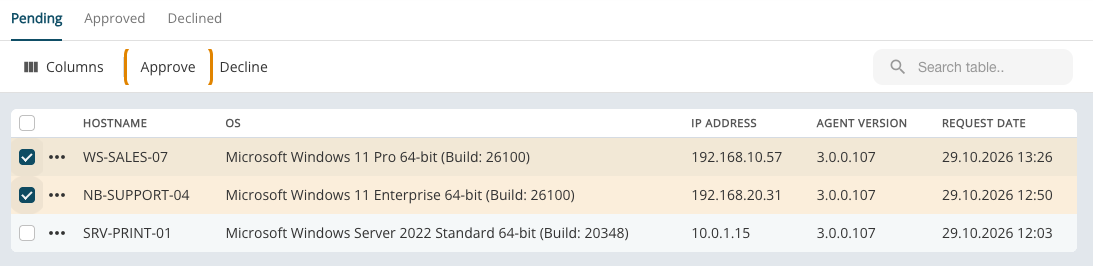
An approved agent connects at its next check-in and shows up in Devices. A declined agent stays out.
A device with this name already exists
If a device with the same hostname is already in your organisation, for example because Windows was reinstalled, XEOX asks what each new agent becomes:
- New device: a second device with the same name. Rename one later to tell them apart.
- Take over: the agent continues the existing device, with its history, tags and automations; the device's previous agent is signed out.
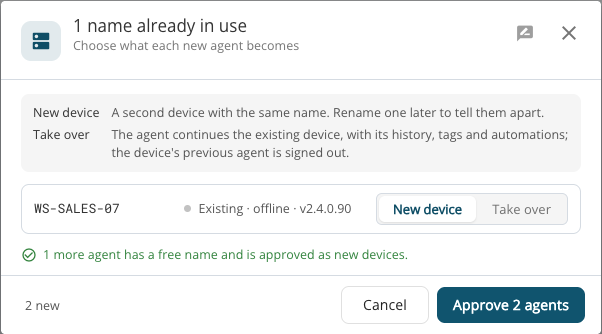
The agents with a free name are approved as new devices in the same step.
Approved and Declined
The Approved tab shows when each agent was approved and by whom, when it last signed in and how often. The Declined tab shows when and by whom an agent was declined.